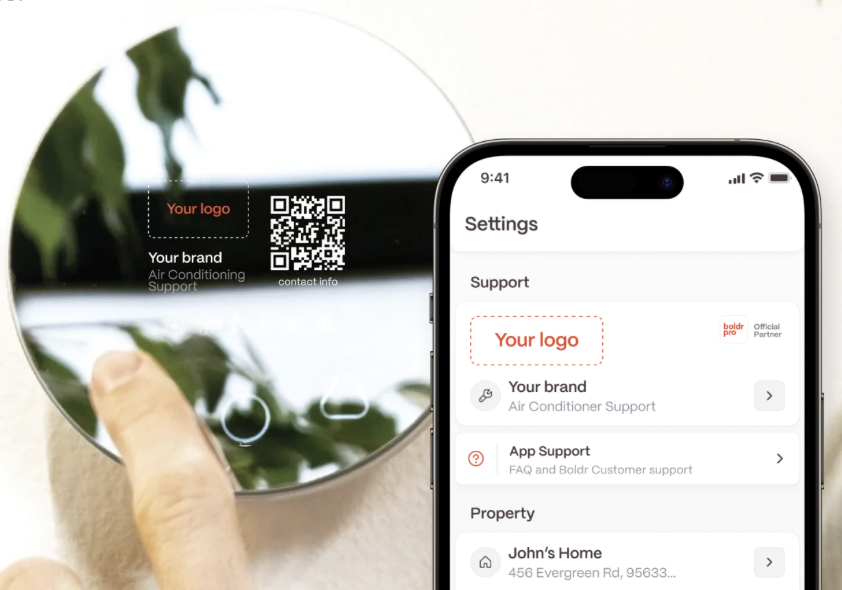
ProBranding displays your logo and contact information on every controller and within the Boldr Pro App.
Give your customers direct access to support and reinforce your brand identity.
How Does ProBranding Help Your Business Grow?
1. Keep Your Brand Front and Center
Your logo and contact details are always visible—reminding customers who installed their system and who to contact. This builds trust and promotes referrals.
2. Do Not Spend on Ads to Keep Your Own Customers
Customers won’t need to Google your business. Your info is just one tap away, reducing accidental ad clicks and saving budget.
3. Flexible Communication Options
With the Pro Branding feature, let customers reach you by phone, email, or through your website.
ProBranding lets your end users share images of error codes or other system pictures directly with the maintenance or repair team.
How to Access ProBranding
The ProBranding feature is a part of the Boldr Installer App subscription, downloadable from the Apple App Store and Google Play Store.
To unlock ProBranding benefits, simply enter your brand details in the Boldr Installer app. Once added, your branding will automatically appear across all installers you set up.
Steps to Access The ProBranding Feature:
Open the Boldr Installer App.
At the top of the screen, click the icon beside your profile.
Once clicked, you will be able to see all of your companies details filled in.
Select the ''Preview'' icon above, to see how your business details appear in the end user app.
Need Help?
Contact our Live Pro Tech Support Team at +1 (888) 269-1303, Monday to Friday, 9 AM to 6 PM ET.